

Free to start. No account needed for your first analysis.
Download a template
Word (.docx), one page each. Every person and company on them is fictional: an example to replace.
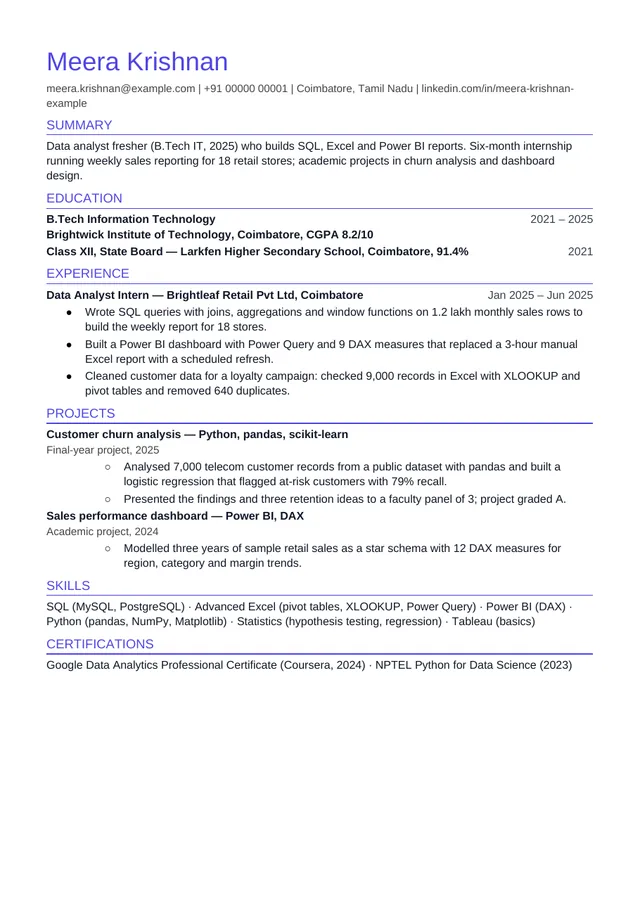
Freshers and graduates
Modern Minimal
Education first, then internship and projects, for your first job.
Arial · A4 · .docx
Download Word file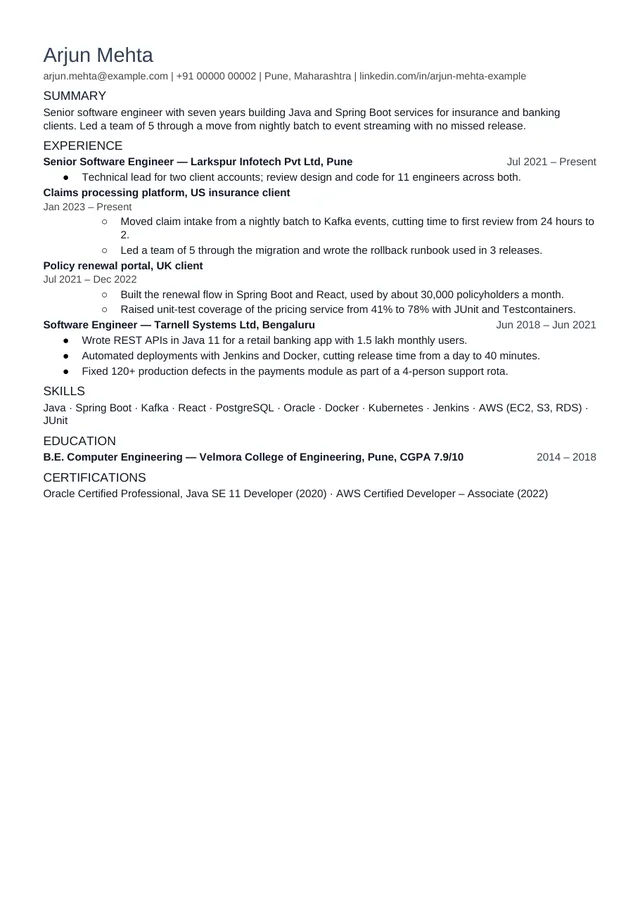
Experienced, IT services (India)
Compact one-page
Client projects listed under each employer, on a tight one-page layout.
Arial · A4 · .docx
Download Word file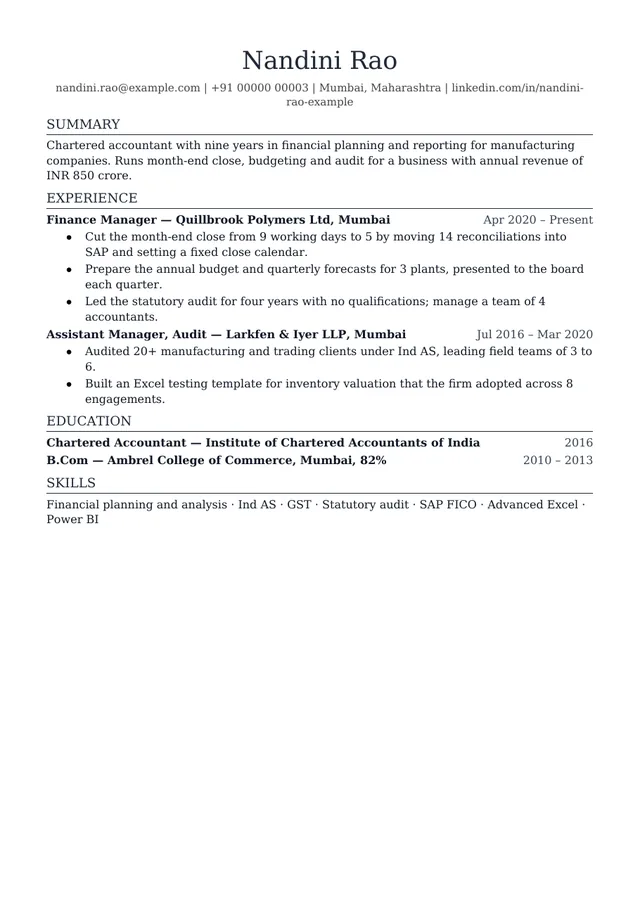
Experienced, conservative fields
Classic Professional
A serif layout for finance, law, government and other traditional employers.
Georgia · A4 · .docx
Download Word file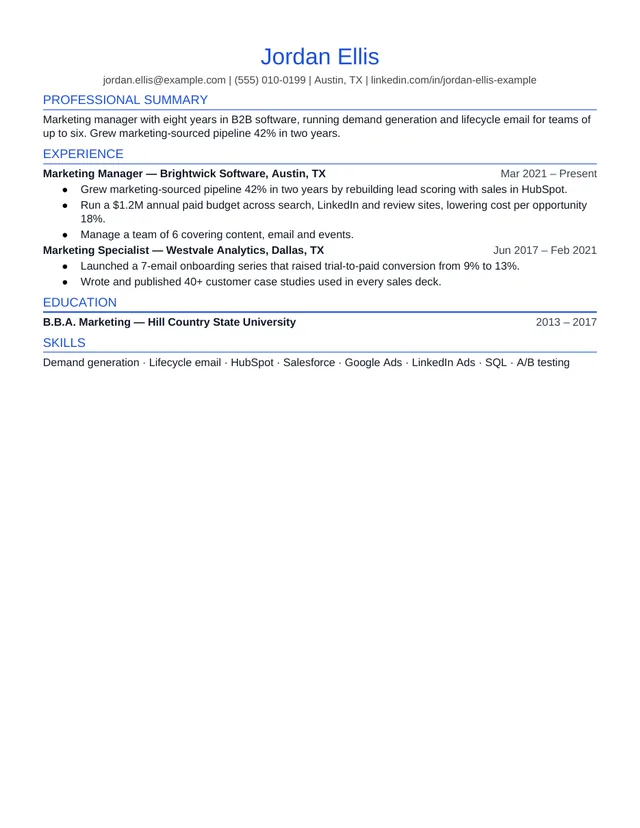
Applying in the United States
US Standard
US conventions: no photo or personal details, quantified bullets, Letter paper.
Arial · US Letter · .docx
Download Word file
Files last generated October 19, 2026.
What makes these templates ATS-safe
Every file is built the way the app builds a download, and these are the things it does:
- One column, top to bottom. No sidebar, so software can’t read across the page and mix your skills into a job.
- Real text in ordinary paragraphs. No tables, text boxes, images or icons. Your name and contact details are typed text, not a picture.
- Standard section names: Summary, Experience, Projects, Education, Skills, Certifications. These are the headings applicant-tracking systems map to fields.
- Headings are marked as headings (Word’s Heading 2 style), and bullets are Word’s own list bullets, not typed symbols.
- One line per role. Title and employer on the left, dates pushed right with a tab stop, in one date format throughout.
- Common fonts. Arial for the sans layouts and Georgia for the serif ones, at 10 to 10.5 point body text, with margins of at least half an inch.
Before a file was saved here, the app read it back and confirmed the Word file and the PDF contain the same lines.
What a template can't do
A clean file only makes sure software reads your resume correctly. It doesn’t make the resume a good match for a job. Recruiters search and filter for the skills and experience a posting asks for, and a person then skims the top of page one. What decides that is the content: the requirements you show, with a line that proves each one.
That is why the same resume should change a little for each application. Lead with the evidence that job asks for, use the posting’s names for tools you really use, and cut what doesn’t help. Our tailoring tool does this from your own lines and never adds a skill you haven’t confirmed.
How to fill one in
- Replace the header first. Your name, then phone, email, city and LinkedIn on one line. Skip a photo, date of birth and a declaration unless an employer asks for them.
- Write each role on its own line, then press Tab before the dates so they move to the right margin. Keep the same date format everywhere, such as “Jan 2025 – Jun 2025”.
- Two to five bullets per role. Start each with what you did, then what changed, with a number where you have a real one.
- Delete every example line you didn’t replace. A leftover sample bullet is worse than a short resume.
- Save as .docx or export to PDF, whichever the application asks for, and name it after yourself, such as Meera-Krishnan-Resume.pdf.
Freshers, experienced and India formats
Freshers put education near the top with the CGPA or percentage, then internships and projects. The Modern Minimal file is laid out that way. Our resume format guide for India explains what to keep and what to drop for Naukri and company portals.
In IT services, list each employer once and put client projects underneath it. The Compact file shows this with two projects under one role.
With several years of experience, experience comes first and education moves down, as in the Classic Professional and US Standard files.
Tailor it to the job before you send it
Once your details are in, paste the resume and the job posting into Resumeize. You’ll see each requirement matched to a line in your resume, or marked missing, with an ATS score and a recruiter score calculated in code. The score is free; one credit tailors one job application, and your first application is free. Try the keyword scanner.
Questions people ask
- Are these templates really free?
- Yes. The four Word files download straight from this page with no account, no email and no credit. Open one in Word, Google Docs or LibreOffice, replace the example text with your own and save it.
- Will a template make my resume pass the ATS?
- No template can promise that. A clean layout makes sure screening software reads your name, roles, dates and headings correctly, which is the part a file can control. Whether you are shortlisted depends on what the resume says against the job: the requirements it shows, in your own words.
- Can I use these in Google Docs?
- Yes. Upload the .docx to Google Drive and open it with Google Docs. Google Docs has Arial and Georgia, so the fonts carry over; spacing may shift slightly, but the single column, headings and bullets stay as they are.
- Who is the person on the sample resume?
- Nobody. Every name, employer, college, phone number and figure on the samples is invented to show how a real resume fills the layout. Replace all of it with your own details; never keep a figure you can't stand behind.
- Why A4 and not Letter?
- India, the UK, Europe and most other countries print on A4, so three templates use it. The US Standard template uses US Letter, the size American employers print on. In the app, twenty layouts include one for each major hiring country, from Canada (Letter) to the Gulf, Singapore and Japan (A4); see the resume layouts page for which to use where.
- Why do the dates sit on the right?
- Each role is one line: title and employer, then a tab stop that pushes the dates to the right margin. It is a real tab, not a table or a text box, so software reads the role and its dates as one line in the right order.
Keep going
- Data analyst fresher resumeThe fresher template, filled in for a data analyst role, with how it scores against real postings.
- Are Canva two-column resumes ATS-friendly?What happens to a designed, two-column resume when screening software reads it.
- Tailor your resume to a jobPaste a posting and your resume. Get a tailored draft built only from what's true.
- Resume keyword scannerEvery requirement in the posting, marked matched, partial or missing, with the line that shows it.
- Resume layouts that pass ATSTwenty single-column layouts in the app, with country formats from the US and UK to the Gulf and Japan. Switch in one click.
Paste your resume and a job posting. Your first analysis is free and needs no account.